Context engineering for coding agents: what to load and what to guard
Context engineering for coding agents is the practice of deciding what an agent can see while it works. Because the agent re-sends its whole context on every call, a large or cluttered context makes sessions slower, more expensive, and less accurate. The goal is to load only what the task needs and guard against everything else.
Most developers focus on the prompt, but the prompt is a small part of what the agent reads. In this article, I explain what fills the context window, where your tokens really go, and how to keep your sessions small.
What is the context window, and what fills it?
The context window is the maximum amount of text, measured in tokens, that a model can consider at once. In a coding session, it fills with your instructions, the conversation, every file the agent read, and every tool result. That includes long command output and screenshots.
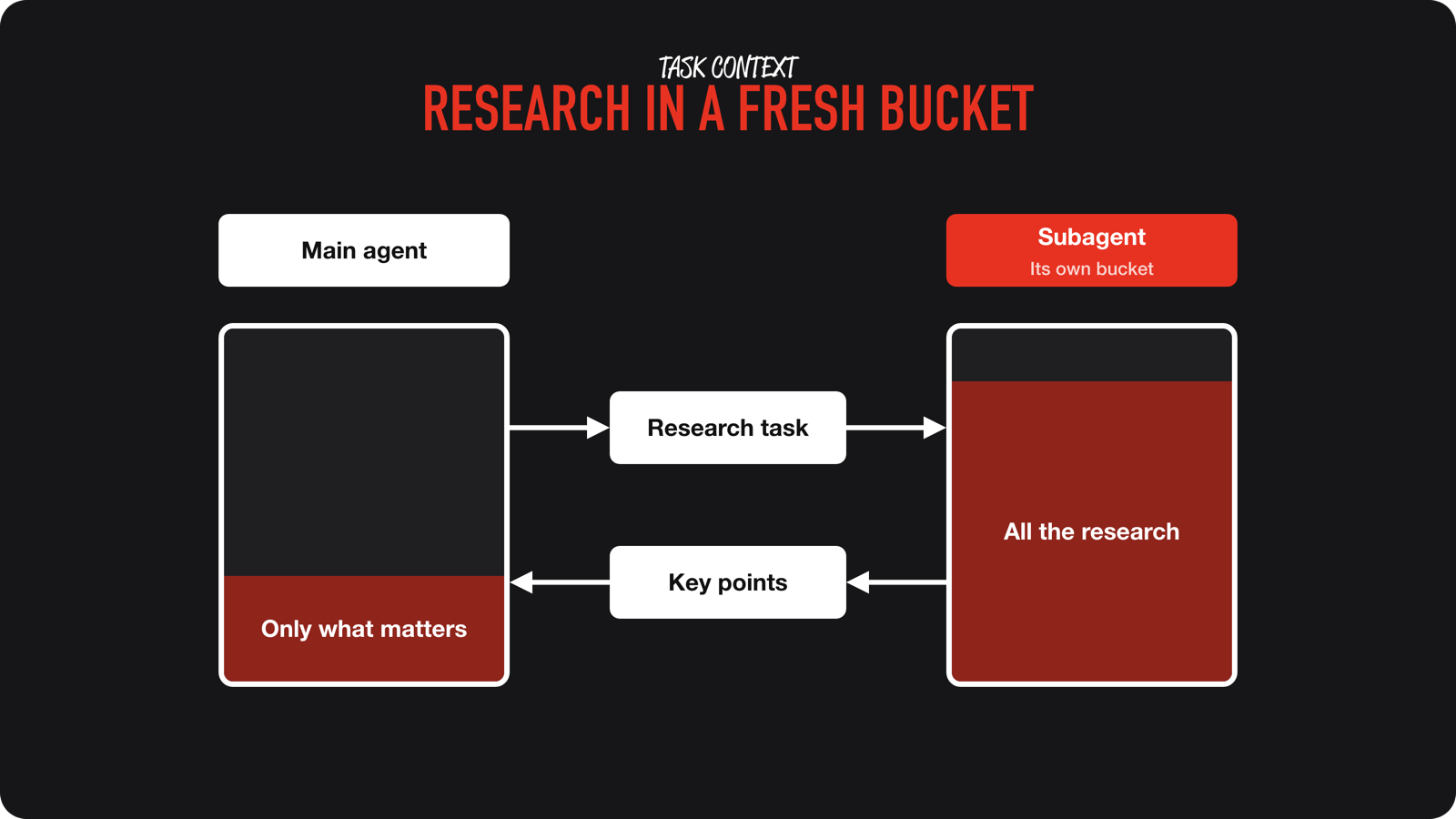
Nothing leaves on its own. Each step adds to it. You can think of it as a bucket that only gets fuller during a session.
Where do the tokens actually go?
Not where most tips assume. Every agent call re-sends the existing context, and the provider serves the repeated part from a cache. Those are cache reads, and they dominate.
In my analysis of 1,674 agent sessions, 94.2% of all tokens were cache reads. Only 0.6% were the agent’s replies. Shorter answers barely change the bill. You can find the data in my token usage analysis on SwiftLee.
A reader who ran my cleanup prompt saw the same pattern. They used about 4.4 billion tokens in 7 days across 133 transcripts. 98% were cache reads, and 52% of calls carried more than 400K tokens of context. You can read what the prompt found for that reader.
What makes context grow too large?
Three patterns show up again and again:
- A session that never ends.
One long session keeps growing until something compacts it, and every later call re-reads all of it. - Heavy tool results.
Screenshots and long command output stay in context for the rest of the session. - Instructions that load everything.
A bloated AGENTS.md is paid for in every session, whether the task needs it or not.
The second one hit me personally. I often let my agent read raw Xcode build output. That is a huge amount of input tokens, while all I wanted to know was whether the project built, with or without warnings and errors. After I reduced the output to just that, my token usage dropped drastically.
How do you keep context small?
- Start a fresh session for each new task.
Carry over a short summary, not the whole history. - Load on demand.
Keep task-specific material in separate files and point the agent to them only when needed. - Limit what tools return.
Prefer targeted commands over dumping whole logs, and avoid screenshots unless the task is visual. - Delegate noisy work.
Searching a codebase or reading many files belongs in a subagent, whose context is thrown away afterwards. - Put durable requirements in durable places.
Constraints that only live in a chat can be lost when the agent summarizes.
What happens when the context gets full?
You will barely notice it. Most tools show the context filling up slowly, but not prominently. In Cursor, you see “summarizing context”, and then the agent just keeps going. It does not stop and tell you it is full. If you run an agent in the background, you may never see the reset happen.
This is called compaction. The agent summarizes the session to free up space, but the summary is lossy. Details you only mentioned in the chat can be dropped. That is one reason output quality can fall in long sessions, which people often call context rot. A smaller, relevant context gives you cheaper sessions, and usually better results as well.
How do you check your own setup?
Ask your agent. Agents are good at reading their own past sessions, so you can ask which sessions were the largest, which models ran, and which tool results stayed in context. I use the same approach to find where I lose time. The free token cleanup prompt does this analysis for you and proposes changes.
Conclusion
Context engineering comes down to one idea: every token in the window is re-read on every call, so keep the window small and relevant. Start fresh sessions, load on demand, and keep noisy work out of the main session.
If you want to see where your own tokens go, try the free token cleanup prompt. If you want the full system for context, instructions, and validation, join the waitlist for the AI Fundamentals course. Feel free to contact me or tweet me on Twitter if you have any additional tips or feedback.
Thanks!